Rooms and tables like at the office. You sit next to a colleague and talk on video, with the shared screen and the table chat. No links to send.
Book 30 minutes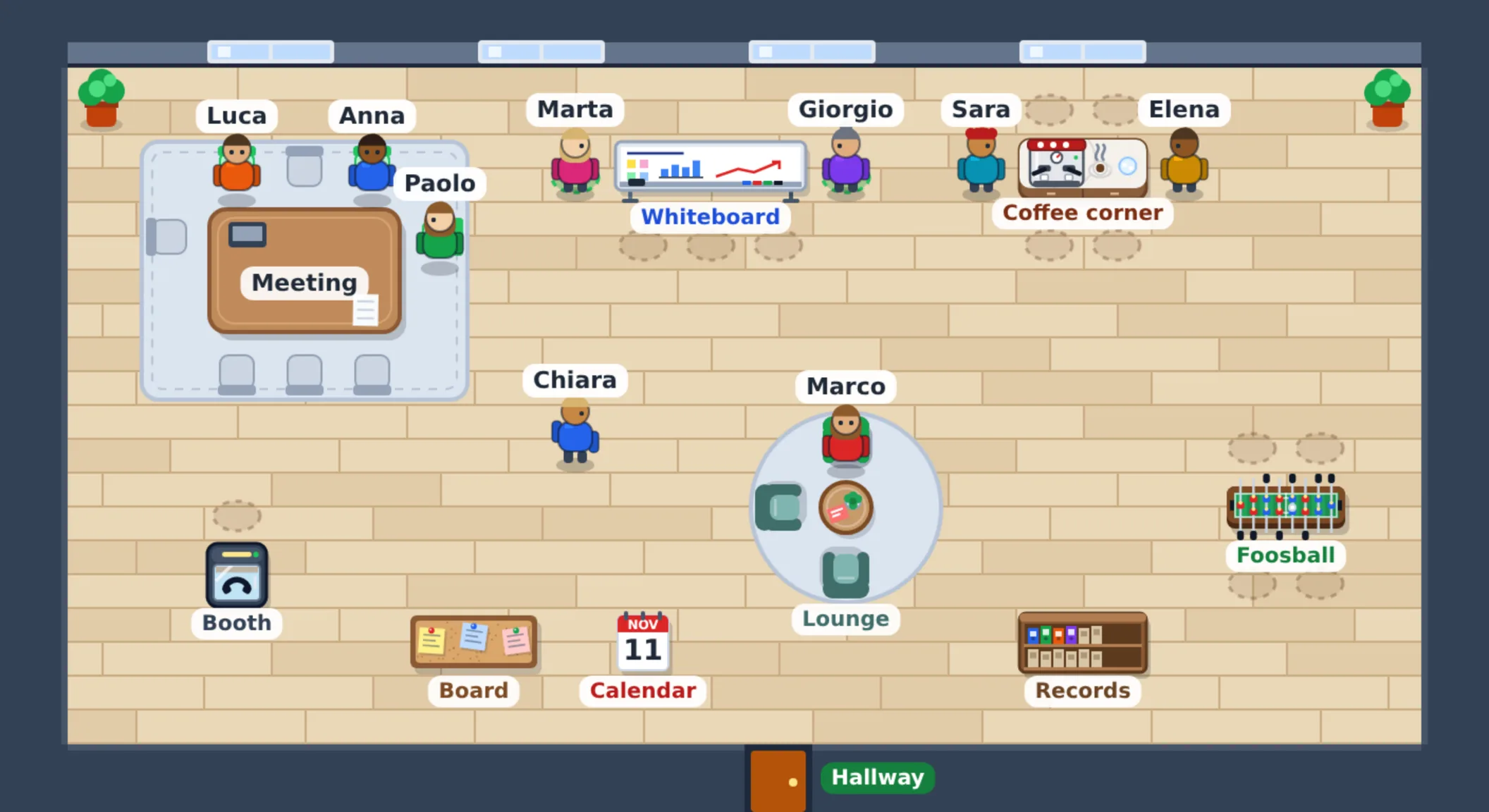
When people also work from home, meetings turn into links to send and calendars to match. Nobody knows who is free, and a quick question becomes an appointment.
To know if a colleague is free you message them and wait for the answer.
Every call has its own link, to create and send to everyone.
During the meeting the project and the order are searched in another window.
Talking to a customer needs another program, with another account.
Your figure enters from the hallway. You see who is in, where and who is on a call.
You walk to a table and sit down. The call is with whoever sits there.
Video, shared screen and the table chat, with the documents you are talking about.
The table is booked from the Calendar. You invite colleagues and, when needed, customers.
Rooms line a hallway, with the reception at the entrance. You arrange them by dragging tables and objects.
Each with its name, size and colour. The reception lists the tables, who is sitting and the bookings.
At the table you work sitting down. In front of the whiteboard you hold the morning stand-up. Both can be booked.
For breaks. Chat and call like at a table, but here you talk about other things.
A comfortable chat, or a one-to-one call without disturbing the room.
Walk up to read the latest board messages, today's bookings and your appointments.
The pages you need in the meeting, for example companies, quotes or projects, one click away.
The documents being discussed are on the table, and everyone opens them with their own permissions.
Camera, microphone and shared screen. It starts with a button, or as soon as you sit down if you prefer.
Messages stay for 30 days. Whoever sits down later reads what was left.
Projects, tickets, orders, quotes and companies you are talking about, with number, name and status.
Paste the link of a project and its card appears under the message, ready to put on the table.
They are Calendar appointments, with company and project. During the booking only invitees sit at the table.
Your next meetings and who is in the office now, with the button to walk in.
In the booking you invite the company's customers. They receive the link and the reminder, and join with their account.
The customer has a page of their own, with call and chat. They do not see the office, or the documents on the table.
They read the messages written during the meeting, not the earlier ones. Whoever sits at the table sees a notice.
Nobody, all users or only some. Admin and backoffice always can, and the rule holds in the database too.
They go through LiveKit, an external service, with an account of your company. For a small office the free plan is enough.
In the browser, the office with your figure. On the phone, the rooms as a list, the chat and the call.
Thirty minutes, no commitment. You leave with an honest technical opinion on what is worth automating.
Book 30 minutes Terra di App
Custom cloud business software, built on a base that already works. Source code and infrastructure stay with the client.

2026 Dino Solano · VAT 10312320962 · Milano · All rights reserved