Software for tracking project costs and margins. Everyone logs their own hours on the activities they work on, customer and supplier invoices are allocated to the project, and the system works out accrued, to invoice and margin. A traffic light tells you which projects to look at first.
Book 30 minutesWhile the jobs are few, hours go on a sheet and the margin is estimated by eye. Then the projects become ten, the people five, and the answer only arrives once the work is done, when nothing can be fixed any more.
Excel sheets, messages, reconstructions from memory at the end of the month. Nobody knows how many hours a job really took.
Supplier invoices end up in the accounts, but nobody carries them over to the project they belong to.
The deposit agreed at signing, the mid-project instalment, the extra hours. They get invoiced when someone remembers.
That a project was losing money is discovered at the end, when the hours have already been spent.
Customer, billing type, value or rate, hours budget. The system assigns the number and the project starts out already active.
Activities with estimated hours and due dates, and the people who work on them.
Everyone logs their own, from the phone too: activity, day, duration. It takes a few seconds.
Customer invoices become revenue, supplier invoices become costs. The margin updates by itself.
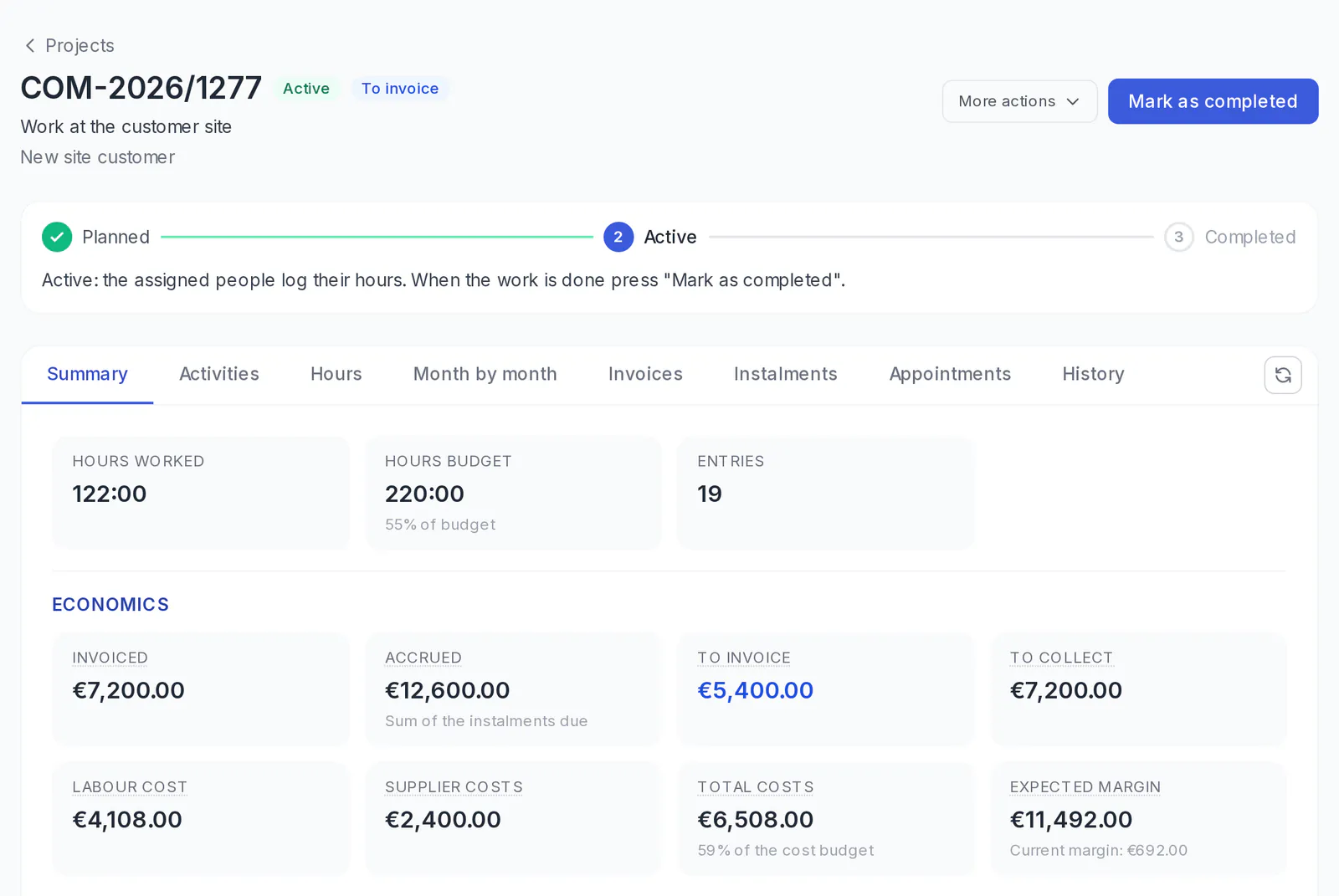
A fixed-price project: two people's hours, a supplier cost, instalments and invoices. The traffic light says an instalment is ready to invoice. Sample data.
The billing type decides where the revenue comes from. Costs are always worked out the same way: all the hours worked, plus supplier invoices.
An agreed value, for example €10,000 for a website. If the customer pays in stages you split it into instalments with an amount and a due date. On the due date the instalment becomes "to invoice", as a reminder. Without instalments, the whole value accrues when the project is completed.
Billable hours are invoiced at the hourly rate, so 20 hours at €50 make €1,000. The hours spent redoing a job are marked as not billable. They remain a cost, but do not become revenue. If you gave the customer a rough estimate, you see how much of it you have already reached.
Work for your own company, with no customer to invoice: the new website, the migration of the management software, training. They tell you how much they really cost.
Every figure is worked out by the database when you open the page, net of VAT. No totals typed by hand, no overnight processing to wait for.
The status sums up in one word how the project is doing, starting from the most serious case: negative expected margin, hours or costs over budget, an amount accrued and not yet invoiced, budget close to the warning threshold. In the list, one click on a status shows only the projects that have it.
Accrued is what you can already invoice, meaning billable hours times the rate, or the instalments that have fallen due. Take away what has been invoiced and you get what is left to invoice. Below the figure you always see where it comes from, for example "20 billable hours x €50".
Each hour is worth the person's hourly cost on the day it was worked, or the standard cost. A pay rise has its own start date and does not rewrite the past.
Supplier invoices are allocated to the project they serve. An invoice covering several jobs is split. For example, €600 of hosting for two websites becomes 400 and 200 on two projects.
The expected margin compares the value of the project with the costs so far; the current margin compares the costs with what you have already invoiced. The first tells you whether the job pays, the second whether what you have invoiced already covers the expenses.
The percentage used is always in view. Past the warning threshold, for example 80%, the project moves to "Attention"; past 100%, to "Over budget". The cost budget is optional.
Customer invoices not yet collected stay in view, and those past their due date end up in the overdue total: of the project, of the list and of the dashboard.
A €3,000 deposit at signing, already invoiced. Mario has worked 40 hours, which at €30 each cost €1,200. The hosting supplier has invoiced €1,500.
Costs €2,700, expected margin €7,300, current margin €300, hours budget at 20%. Status: On track. When the second instalment falls due, an amount to invoice will appear again.
Luca logs 20 billable hours and 2 hours of rework, marked as not billable. Accrued: 20 x 50 = €1,000. Cost: all 22 hours, at €30, that is €660.
Expected margin €340. Nothing has been invoiced yet, so the status is To invoice until you record the €1,000 invoice.
No automatic tracking of attendance or time. Everyone declares their own hours on the activities they are assigned to. The rules are enforced by the database, so they apply from any device.
The week from Monday to Sunday, with the total for each day. From there you log, correct and delete; for a quick entry there is also a button on the dashboard. Hours can also be logged from a calendar appointment or from a ticket.
Hours and minutes in two boxes, or the quick buttons from 15 minutes to 8 hours, and 1.5 means an hour and a half. The note is optional and the projects offered are the open ones.
No hours on future days, never more than 24 hours in a day, no hours on cancelled projects. Forgotten hours can still be logged on a completed project or a done activity. When a rule is not met, the message says which one.
The company chooses for how many days people can correct their own hours, for example a week. Admin and back office can always correct, and can also log hours on behalf of others.
People who do the work see the projects where they have an assigned activity, with their hours and the deadlines of the coming days. The rest does not appear.
Project value, rates, margins and hourly costs stay with admin and back office. Whoever logs hours does not see them, not even their own cost. The database guarantees it, not the interface.
Prefix and counter reset at the start of the year, as for quotes and orders: COM-2026/0001, COM-2026/0002 and so on, with no duplicates.
The hourly rate offered on new time-and-materials projects, which can then be changed project by project, the budget warning threshold and the number of days within which people correct their own hours.
A standard cost and, where needed, a cost per person, each with the date from which it applies. It is data linked to pay, so only admin and back office can see and change it.
Admin and back office see projects by status, the amounts to invoice, the overdue total and the hours of the period. People who do the work see their hours and the activities due in the next seven days.
With the Orders module a project can start from an order. An invoice recorded from the project is offered already linked to the order too. One action, two links.
A company's record shows its projects and its invoices, a supplier's record the invoices received. Anyone with projects or recorded invoices cannot be deleted by mistake.
Each company decides in which statuses a project can be deleted. The excluded statuses are rejected by the database, whatever route is used.
From the phone you create projects, from an order too, with activities, instalments and invoices. You log hours and follow the status.
As with every module of the platform, one company's projects are not visible to any other. Isolation is guaranteed by the database, not by the application code.
TdA does not replace your accounting software or your accountant. It does not produce the electronic invoice and does not send it to SdI, the Italian e-invoicing system. The invoice you have already issued is recorded here (number, taxable amount, due date) to know which project it belongs to, what is left to invoice and what is left to collect.
Thirty minutes, no commitment. You leave with an honest technical opinion on what is worth automating.
Book 30 minutes Terra di App
Custom cloud business software, built on a base that already works. Infrastructure and data stay with the client.

2026 Dino Solano · VAT 10312320962 · Milano · All rights reserved